

Connect to On-Prem or Single-Tenant (Private) Backend Server
Use this page to connect your Forensic OSINT workspace to your organization’s Private backend. This applies to both Single-Tenant (Managed Private) and Self-Hosted On-Prem deployments. The connection is made by entering your Backend URL.
Prerequisites
The Private Server option appears only after your account is activated. If you do not see it, complete activation first: https://www.forensicosint.com/support/activate-code
Steps
1. Log into your account and open the Case Management System (CMS).
2. Click the Link icon (①), select Private Server, then click Connect to Private Server (②).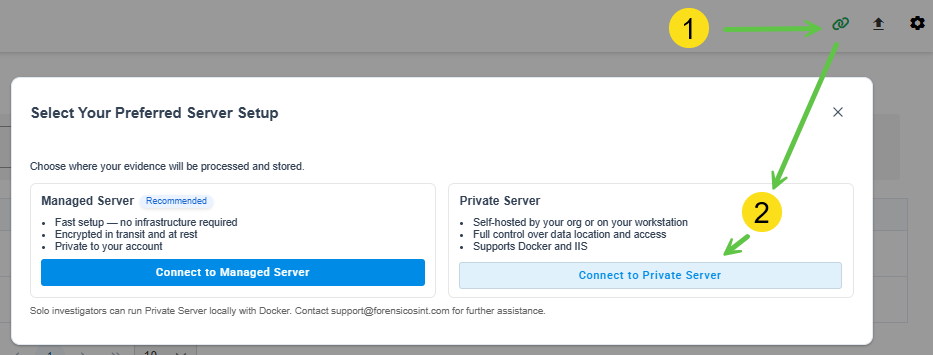
3. In the Private Server or Custom Deployment dialog, expand I already have a Private Backend URL (③).
4. Enter your Backend URL in the field (④). Examples: https://agency.forensicosint.com or http://localhost:65200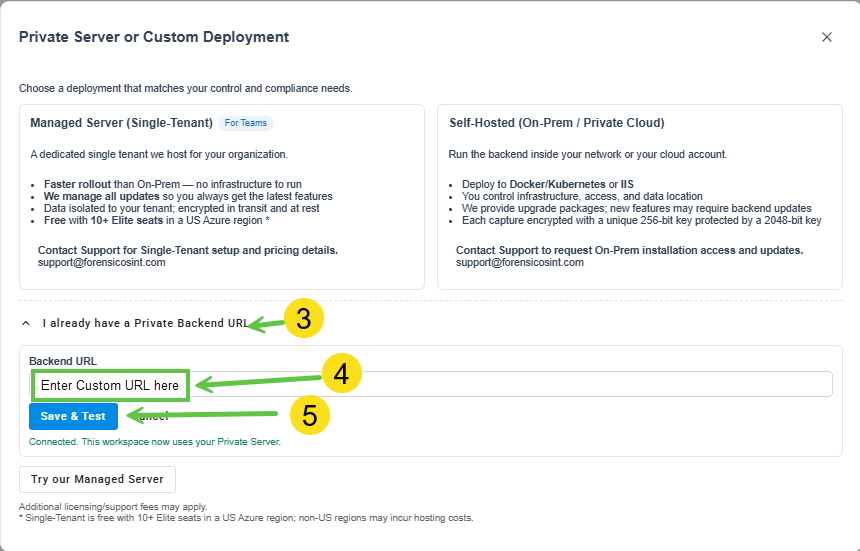
5. Click Save & Test (⑤) to confirm the connection.
🔍 The first user to connect becomes the Admin automatically. This account can grant Admin access to others.
Verify Your Connection
After saving, you will see a success message. Your workspace now uses your Private Server for captures and syncing.
Troubleshooting
If the connection fails, check the following:
• The URL includes https:// when required, and the port is correct for On-Prem (for example, http://localhost:65200).
• No extra spaces, trailing slashes, or typos in the Backend URL.
• The backend is reachable on your network and not blocked by a firewall or proxy.
Still stuck? Verify your activation and try again: https://www.forensicosint.com/support/activate-code